

A permanent room in a virtual classroom site is a reserved online room that is active for good, enabling constant access to users. Unlike single sessions, a permanent room can be reused multiple times for meetings, classes, or discussions without having to redesign the room for each session.
It best suits recurring courses, group projects, or workspace settings where constant interaction is a requirement. Users may enter at any time up to the specified end date or the maximum occurrence limit, which is reached.
Having a permanent room avoids wasted time and ensures ongoing availability, hence making virtual learning and remote collaboration more flexible and efficient.

When this is on it means you can enter your class anytime during the selected date and time. The room you have created is not deleted when left it, you can retake your session anytime.
You can also set the recurrence limit: For example if you set 30 recurrence your room will be deleted after 30 takes.
Understanding Recurrence in Scheduling
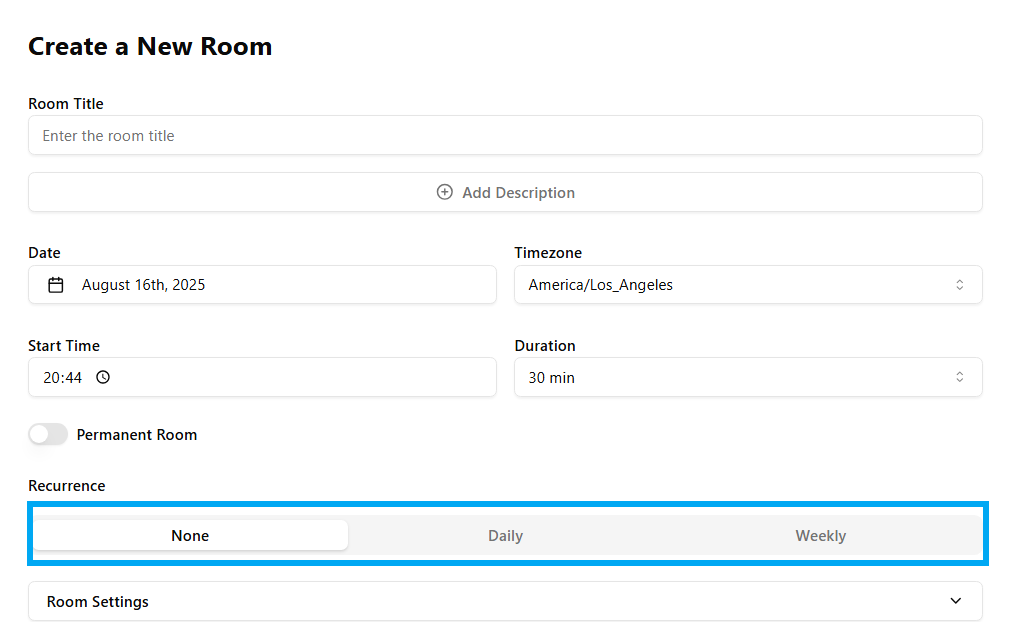
While making online classes, meetings, or reminders, most of the time you want them to occur again and again. Rather than making them again and again every time, the recurrence facility assists you in automating it. Recurrence is such a function where your session gets repeated automatically as per your preferred schedule saving time and effort.
The recurrence options that you can see are:
None: The event will not repeat.
Daily: The event will be repeated daily.
Weekly: The event will repeat on particular days of the week.
Let's move on to Daily and Weekly recurrence in detail.
1. Daily Recurrence
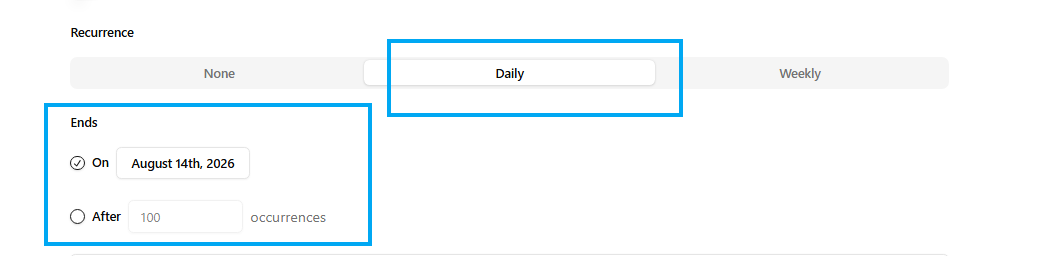
As you can see, if you click Daily, your session will be repeated daily at the same hour until the end date you specify.
Important Points:
Once you select Daily, the event is automatically repeated on all days.
You do not have to choose weekdays manually; it will cover all of them.
You can specify when it ends:
After a specified number of occurrences (after 100 sessions).
Example: If you book a class at 10:00 AM with daily recurrence, it will occur at 10:00 AM every day up to the specified end date.
2. Weekly Recurrence
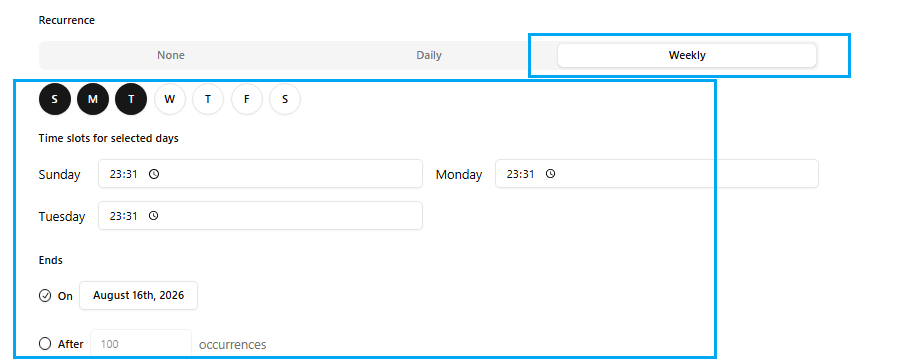
As we can see, weekly recurrence enables you to select individual days of the week on which the event will repeat.
Key Points:
You may select several days (Sunday, Monday, Tuesday, etc.).
You may allocate different time slots for each of the selected days.
Similar to daily recurrence, you have the option to specify when it will finish, after some number of occurrences.
Example: If you wish to have classes every Monday, Tuesday, and Sunday at 11:31 PM, you simply choose those days and enter the time for each. The system will duplicate the sessions weekly on those very same days and times until the end date.
Conclusion
Recurrence settings simplify the scheduling process by automating recurring events.
Daily recurrence = repeats daily.
Weekly recurrence = repeats on selected days of the week.
Setting an adequate end date or occurrences will ensure your schedule is organized and executes exactly as intended.